
 More
MoreHow to Find Ather Electric Scooter Charging Stations in Your City
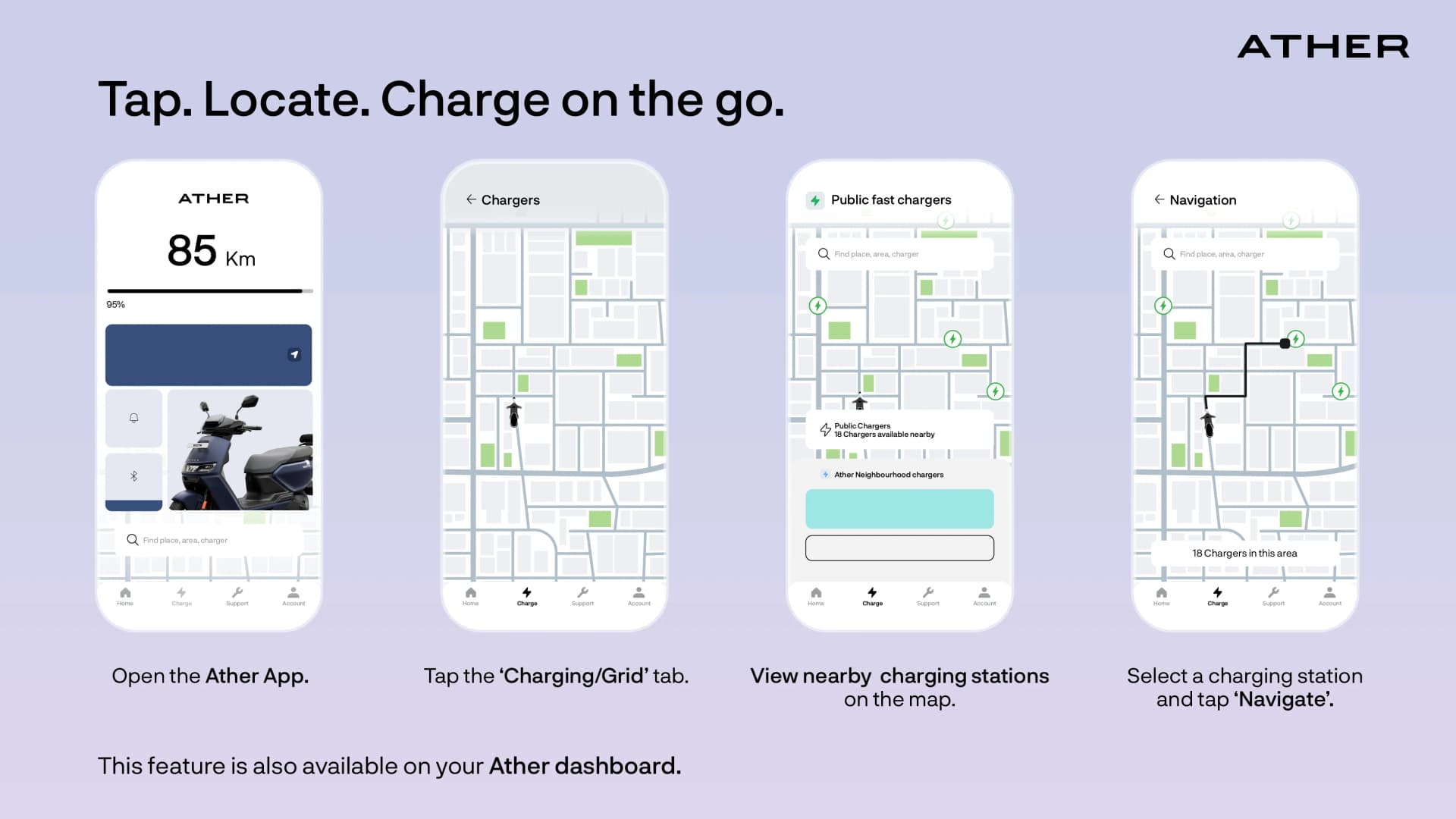
Ather currently boasts the largest and widest public charging infrastructure for electric two-wheelers in India. With a massive network of 6,100+ fast chargers spread across more than 395 cities, the Ather Grid ensures you are never far from a quick top-up. Whether you are navigating through daily city traffic or planning an intercity ride, knowing exactly where to find a station is the key to a seamless experience.
How to use the Ather app to find charging stations?
The Ather App is a key part of the Ather ecosystem, designed to keep you connected to your scooter, remotely. Here are the simple steps to locate and navigate a charging station:
- Open the Ather App: On the home screen, you’ll see your current range and location.
- Tap the 'Charging' Tab: Select the 'Grid' or 'Charging' icon. This opens a map view dedicated to the Ather Grid.
- View Nearby Stations: The app will automatically show you the ev charging stations closest to your current location.
- Send to Scooter: Once you pick a station, you can tap 'Navigate' to push the location directly to your scooter’s dashboard for directions.
How to Find EV Charging Stations: The Best Methods
While the network is vast, the most important thing for a rider is finding a charger easily in a time of need. There are two primary ways to locate an Ather Grid point:
- The Ather App: This is the easiest and most comprehensive app to find charging stations. It provides real-time data on charger availability, so you don't waste time riding to a station that is already occupied.
- The Scooter Dashboard: You don't always need to pull out your phone. Your Ather’s touchscreen dashboard comes with integrated Google Maps that allows you to search for and navigate to the nearest Ather Grid point directly while you are on the move.
Conclusion
Ather has built an ecosystem where "refueling" is as smart as the scooter itself. By using the app to find charging stations or simply searching on your dashboard, you can leverage a network of 6,100+ points to keep your journey going. Knowing how to use Ather grid app features effectively ensures that whether you need a 10-minute top-up or a full charge, the solution is always just a tap away.

 Sanya Sawlani5 min read
 Sanya Sawlani4 min read
 Sanya Sawlani3 min read
Wish to know more about Ather?
The best things about an Ather can’t be put in words, or captured in images. We’ll take up all your questions, just drop us your number. We’ll call you.
